
Atlantis Integrations
Atlantis uses a well-known, open source integration protocol known as LISS: Lightweight Interoperability Standard for Schools. LISS enables connected systems to pull and push data between them. Atlantis can pull and push data to any system that supports LISS.
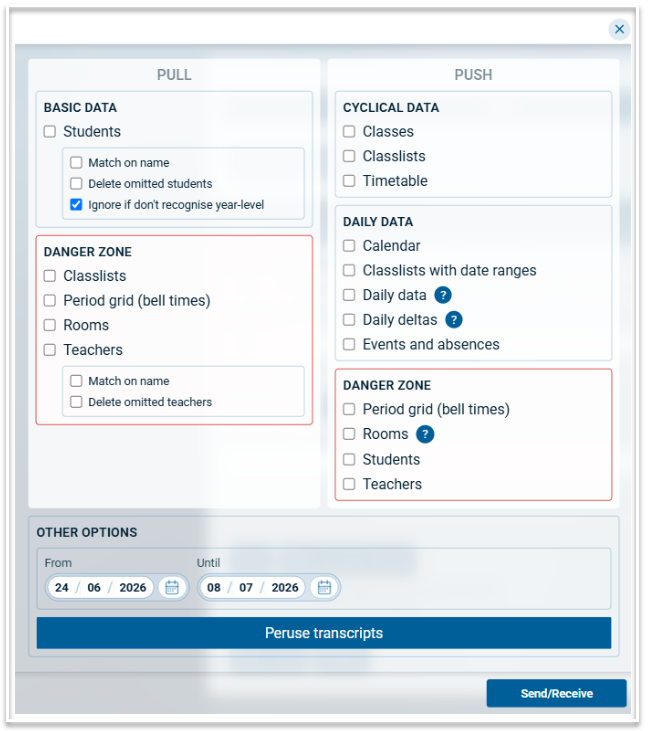
When you connect a system and trigger a sync, the following modal appears. Note that this may vary for diffeerent systems. This article explains what each option does.
Pulling data from your connected system
"Pull students" - do this at least once at the start of the year, and potentially on a regular basis. Usually you don't tick "Match on name" - you'll only do this if you have students in Atlantis but their student codes are missing/incorrect/don't match the SIS. Usually you'll "delete omitted students".
"Pull teachers" - Usually you don't do this. Most schools manually enter the list of teachers. We try to exclude non-teaching staff when bringing the data into Atlantis but there's a risk of getting too many staff members here.
"Pull rooms" - Usually don't do this. You can do it once when first migrating to Atlantis if you think it'll help you set up the file.
"Pull classlists" - Don't do this. Atlantis is the source of truth of classlists.
"Pull period grid" - Don't do this. It's usually easier to do manual data-entry of period grids.
"Pull timetable" - Don't do this. Atlantis is the source-of-truth of timetables.
Pushing data from your connected system
"Push period grid" - Do this if there's a risk the SIS period grid is out-of-date.
"Push rooms" - Don't do this. The SIS doesn't want us telling them about rooms.
"Push teachers" - Don't do this. As above.
"Push classes" - Please do this, regularly. This sends your classes table data to your connected system
"Push timetable" - Do this, regularly. This sends your cyclical timetable data to your connected system
"Push classlists" - Do this, regularly, unless you are not managing classlists in Atlantis. (Most schools do use Atlantis for this).
Daily Organisation Data
Now, if you invoke the screen from the Covers product you'll get these options:🙂
"Push calendar" - Do this at least once at the start of the year.
"Push daily deltas" / "Push daily data" - Pick one of these but not both. Do it regularly. You may also only see one option, that'll be the preferred option nominated by the connected system
"Push events and absences" - Most SIS's don't recognise this and it's a bit experimental.
Syncing
Select the required date range.
When ready, select 'Send/Recieve'
Use the Logs tab to download transcripts and see what data has been sent.