
Questions from the Subject Selection Webinar
The following questions were asked during the Subject Selection webinars held on the 20th and 21st May.
Q. Is it possible to have students input text answers to questions when they are completing their selections?
A. Not currently but we will develop that capability. It is possible to have Yes/No responses collected by adding the question as a reserve row label and having both Yes and No as courses in the Offered courses table.
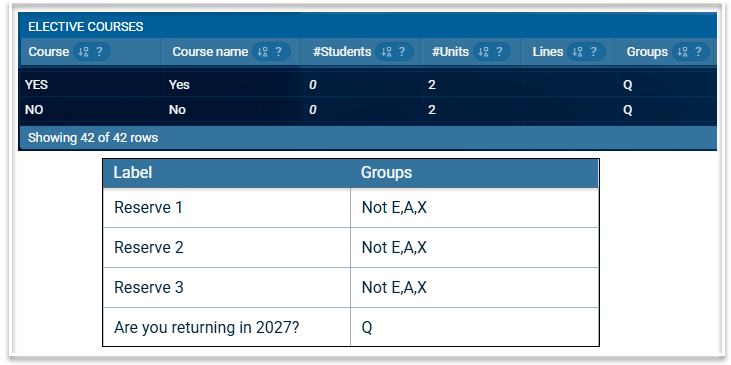
Q. Is there a way to set up selections for stage groups e.g. Years 9 + 10?
A. An elective dataset can be created for multiple year levels and all subjects across those year levels will be available to add to the selection form.
Q. Do parents have the ability to change student selections? Is there a view only function for parents?
A. Parents can be notified of a form opening, when their child submits their choices (including the list of their requests) and the final results (i.e. the subjects they were granted) but they cannot make or change selections on behalf of students. We do not plan to allow this in the future.
Q. Are Parent/caregiver details able to be synced from a SIS?
A. Not currently but they can be imported via a csv file.
Q. Can I import class lists from the 2026 file into the 2027 rolled over file or will I need to maintain class lists in both files?
A. You can import class lists from 2026 into 2027 and they will be linked via the derived from column in the Classes table. Therefore, you do not need to maintain class lists in both files. Also note that students enrolled into the 2026 file after the rollover will be added to the 2027 file when importing class lists.
Q. Is there an ETA on the addition of pre-requisite functionality?
A. We have planned development for pre-requisite functionality, to cater for both previously studied courses and course results, however, there is no estimated time when this will be available.
Q. Can we give the link for testing selection forms to multiple people to assist with testing?
A. There is functionality that enables the timetabler to send links via email to other staff members for testing.
Q. Is there a specific role that only has access to the Electives menu?
A. Currently you need the Timetabler role to access the Electives menu, however, we will investigate the possibility of a new role specifically for managing the Subject Selection and Line Generation processes.
Q. Students are emailed links to the subject selection form. Is the link unique to each student or can the link be shared?
A. The link is unique to each student and only opens up their own form. The link cannot be shared with other students.
Q. Is it possible to import subject selection forms such as the one shown in the webinar?
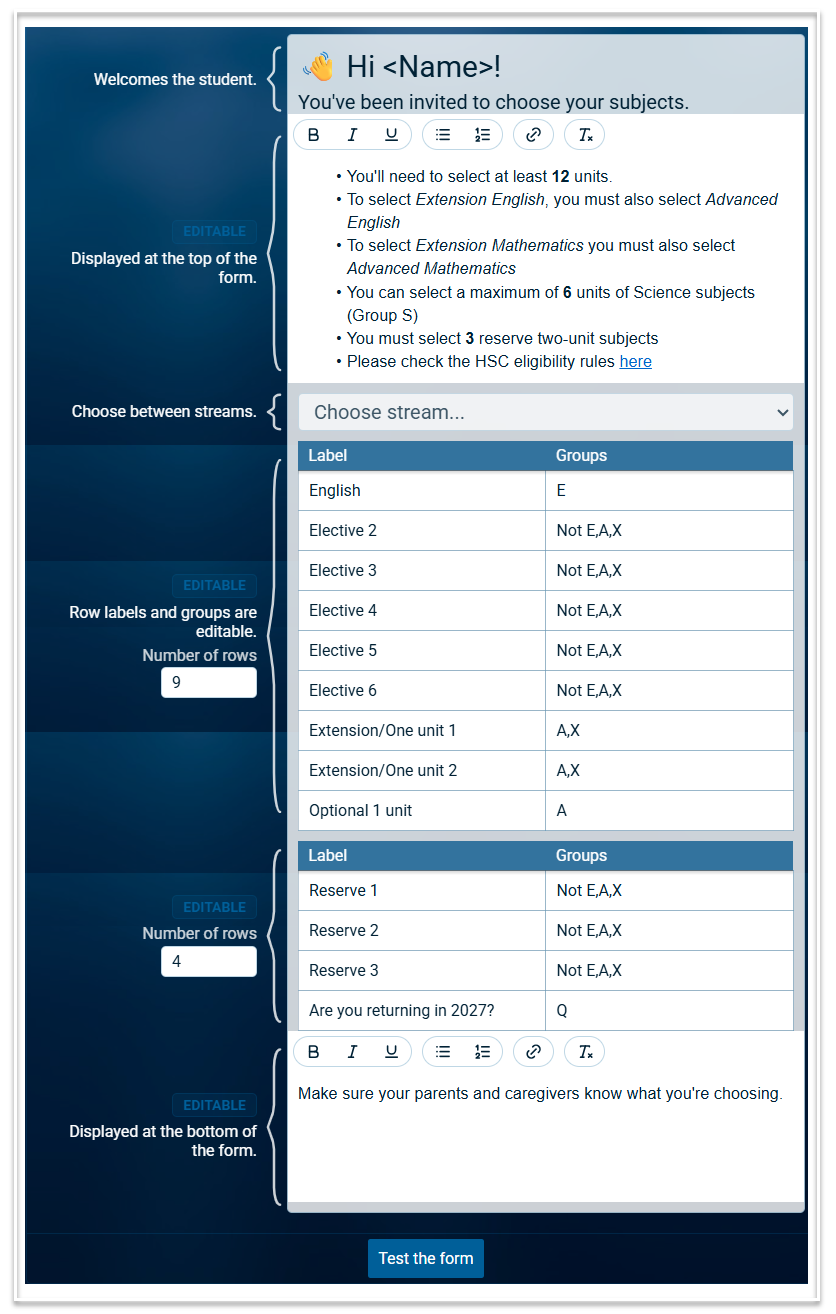
A. No it is not possible to import forms, however here is an example of the form used in the webinar.
Q. When you have selections for multiple year groups, such as stage 5 electives, how can you prioritise one year level?
A. There are several ways to do this. Firstly you can select to email students from one year level only when the form opens. This is done by using the 'Select recipients' option when scheduling and sending emails. The remaining year level can be emailed once the first group of students have made their selections. Secondly, you can investigate the use of streams to manage priority. Thirdly, you can use the priority field in the Student requests table, which will give students with a higher priority, preference when generating lines.
Q. When students break selection rules, they are notified by a letter code which may be confusing for students. Can we map that code to student friendly text?
A. Currently the message displayed when rules have been broken refers to the group letter specified in the Selection Rules table. We will discuss ways in which we can improve the messages to make them easier to interpret. One way to assist students to understand these messages is to refer to the group letter in the text information added to the form, as shown in the Science example in the sample form above.
Q. Will there be a webinar for Line Generation? Do you have any information on this in the Help section?
A. There will be a webinar for Line generation which will be advertised via a banner within Atlantis. The following articles have information about Line Generation: The Lines Screen; Building Elective Lines.